
Skip to content
The ERP that always shows the next step

Your whole business, in one connected loop.

OneBit is a modern, browser-based ERP for growing businesses. Quotes become orders, orders become deliveries, deliveries become invoices, and every screen shows you the next step.

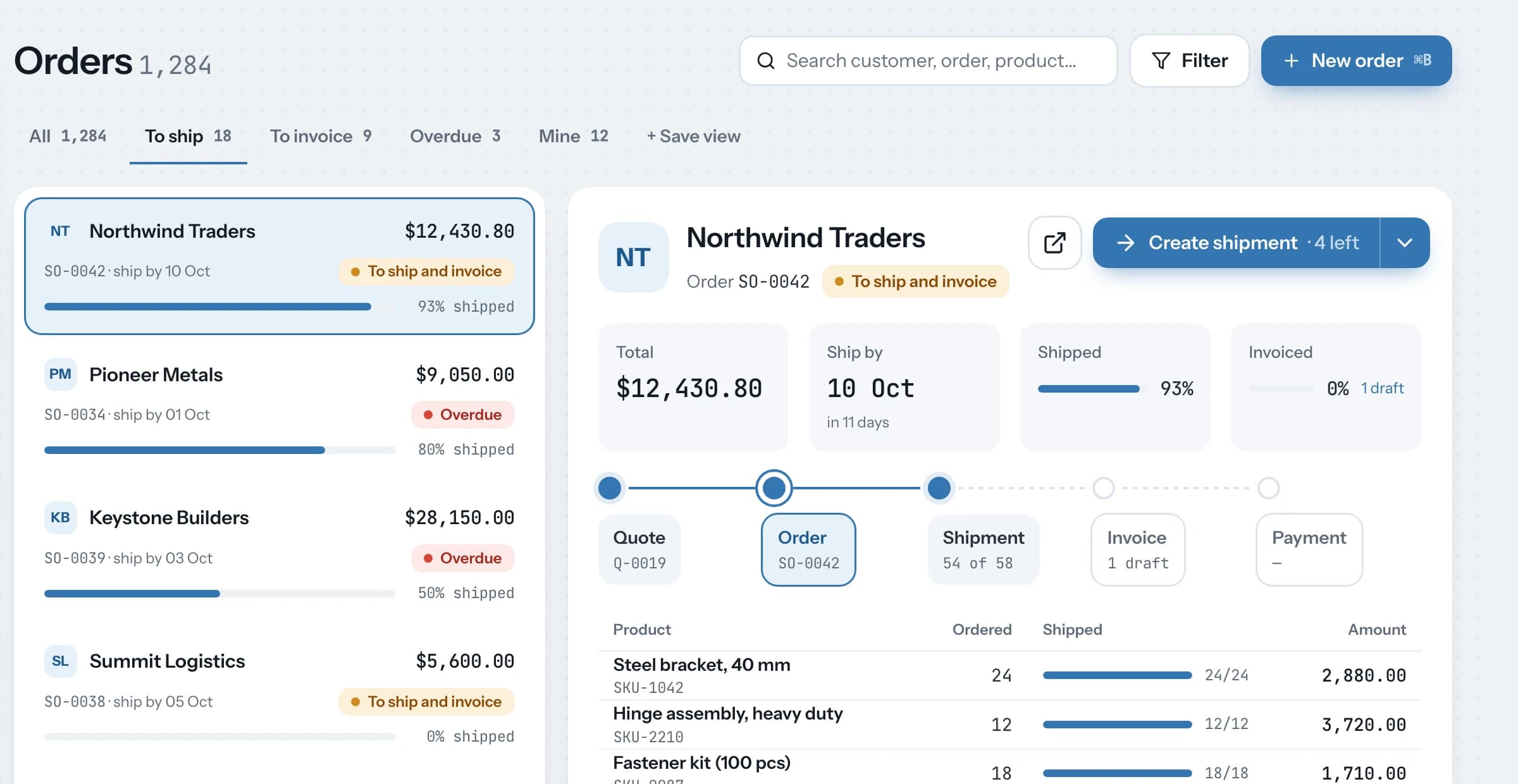
The OneBit Orders work queue: saved views with counts, orders with delivery progress, and the selected order's document chain with a Create shipment button.
Highlights: saved views with live counts, delivery progress on every order, and the next step is one click.

Teams running on OneBit

  • XP Manpower
Why OneBit

ERP that shows you the way, not a maze of menus.

Most ERPs make you learn the software before you can run the business. OneBit is designed around how your team actually works: one document after another, with the next step always in view.

Document flow

Every document knows where it came from, and where it goes next.

Open any invoice and see its quotation, order and delivery in one strip, each a click away. The main button is always the most likely next step, so new staff stop asking "what do I do now?"

  • Delivered and billed progress on every order
  • Key facts first: customer, total, due date, credit used
  • Only the fields your role needs, with the rest one click away
Accounting built in

See the ledger impact before you press submit.

Every invoice, payment and stock entry previews its debits and credits, and warns you about credit limits and price changes as you work. When something does need fixing, a guided correction replaces the old cancel-and-amend routine.

Built for speed

Find anything, create anything, in one keystroke.

Press ⌘K to jump to a customer, open an order or start a new invoice. Work through a queue with J and K, without going back to the list. Your most-used documents stay pinned in the sidebar.

  • ⌘K search and commands
  • J / K next record
  • ⌘S save
Modules

Everything a growing business runs on, in one system.

Eleven modules share one set of customers, suppliers, items and accounts. A sale updates stock and the books at the same moment, with nothing to sync.

Select a module to see what's inside
Selling

Quote, sell and get paid on time.

Turn quotations into orders in one click, track delivery and billing on every order, and keep pricing consistent across every channel.

What you can do
  • Quotations with validity dates and follow-up reminders
  • Sales orders with live delivery and billing progress
  • Price lists, pricing rules, discounts and promotional schemes
  • Customer credit limits and payment terms enforced as you work
  • Blanket and recurring orders for repeat customers
  • Sales analytics by customer, item, territory and salesperson
Typical flow
  1. Quotation
  2. Sales Order
  3. Delivery Note
  4. Sales Invoice
  5. Payment
Key documents
  • Customer
  • Quotation
  • Sales Order
  • Price List
  • Pricing Rule
How it connects

One flow across every module.

Your core business cycles run across departments, so OneBit links each step to the next. Every document carries its history forward.

Order to cash

From first contact to money in the bank

  1. STEP 1LeadCRM
  2. STEP 2QuotationSelling
  3. STEP 3Sales orderSelling
  4. STEP 4Pick and shipStock
  5. STEP 5InvoiceAccounting
  6. STEP 6PaymentAccounting
Modern platform

Built from the ground up for the web.

OneBit is written from scratch on a modern JavaScript stack. You get the depth of a full ERP with the speed and polish of the web apps your team already enjoys.

  • Fast, app-like interface

    Screens switch instantly without full page reloads, and keyboard shortcuts work everywhere.

  • Open API

    Connect your store, bank, shipping and BI tools through a documented API and webhooks.

  • Customize without code

    Add custom fields, approval workflows, print formats and reports to fit how you work.

  • Your data, exportable

    Export any list or report at any time. Your records stay yours.

See OneBit running on your own flows.

A 30 minute walkthrough tailored to how your team sells, buys, and ships. See how OneBit connects the entire process, from quote to payment.